
Genesis Auto Hold Button: How It Works, When to Use It, and Why Drivers Love It
The Genesis Auto Hold button is one of those convenience features that can make daily driving feel smoother, easier, and more comfortable. If you spend time in stop-and-go traffic, wait at long red lights, drive through busy areas of Columbia, SC, or frequently stop on hills, Auto Hold can help reduce the need to keep your foot pressed on the brake pedal.
Many Genesis owners see the Auto Hold button on the center console but are not completely sure what it does, when to use it, or why it may turn off automatically. The good news is that the system is simple once you understand how it works. Auto Hold is designed to keep your Genesis stopped after you apply the brake, then release automatically when you press the accelerator.
This guide from Genesis of Columbia explains what the Genesis Auto Hold button does, how to turn it on, when to use it, when not to use it, and what to check if your Genesis Auto Hold system is not working. Whether you drive a Genesis G70, G80, G90, GV70, GV80, GV60, or Electrified GV70, this feature can help make everyday driving more relaxed.
What Is the Genesis Auto Hold Button?
The Genesis Auto Hold button activates a braking assistance feature that automatically keeps your vehicle stopped after you come to a complete stop. Instead of holding your foot on the brake pedal, the system maintains brake pressure for you until you press the accelerator.
Auto Hold is especially useful during temporary stops. It is not meant to replace the parking brake when the vehicle is parked and unattended, but it can be extremely helpful during daily driving.
Common situations where Auto Hold can help include:
- Stop-and-go traffic
- Red lights and intersections
- Drive-thru lines
- School pickup and drop-off lines
- Railroad crossings
- Congested city driving
- Hilly roads or steep driveways
This feature is standard or available on many modern Genesis models, including the G70, G80, G90, GV70, GV80, GV60, and Electrified GV70.
What Does Auto Hold Do in a Genesis?
Auto Hold keeps your Genesis from moving after the vehicle has come to a full stop. When the system is active, you can take your foot off the brake pedal while stopped, and the vehicle will continue holding its position. When you press the accelerator, Auto Hold releases the brakes smoothly so you can continue driving.
This can be especially helpful in traffic because it reduces the constant back-and-forth movement between the brake and accelerator. For drivers who commute through busy roads in Columbia, Lexington, Irmo, Forest Acres, or nearby areas, Auto Hold can make frequent stops feel less tiring.
The feature also adds convenience on inclines. If you are stopped on a hill, Auto Hold helps reduce vehicle roll while you move your foot from the brake to the accelerator.
How the Genesis Auto Hold System Works
Once Auto Hold is enabled, the system waits until your Genesis comes to a complete stop. When you press the brake pedal firmly enough, Auto Hold engages and keeps the vehicle stopped. A dashboard or instrument cluster indicator usually confirms that the system is holding the brakes.
Here is a simple breakdown of how Genesis Auto Hold works:
- You press the Auto Hold button.
- The system becomes active and ready.
- You drive normally.
- You come to a complete stop and press the brake pedal.
- Auto Hold maintains brake pressure.
- You can remove your foot from the brake pedal while stopped.
- When you press the accelerator, the brakes release automatically.
The system works with the vehicle’s braking controls and electronic parking brake system. It is designed to operate smoothly and predictably, so drivers can use it with confidence during everyday driving.
Where Is the Auto Hold Button Located in a Genesis?
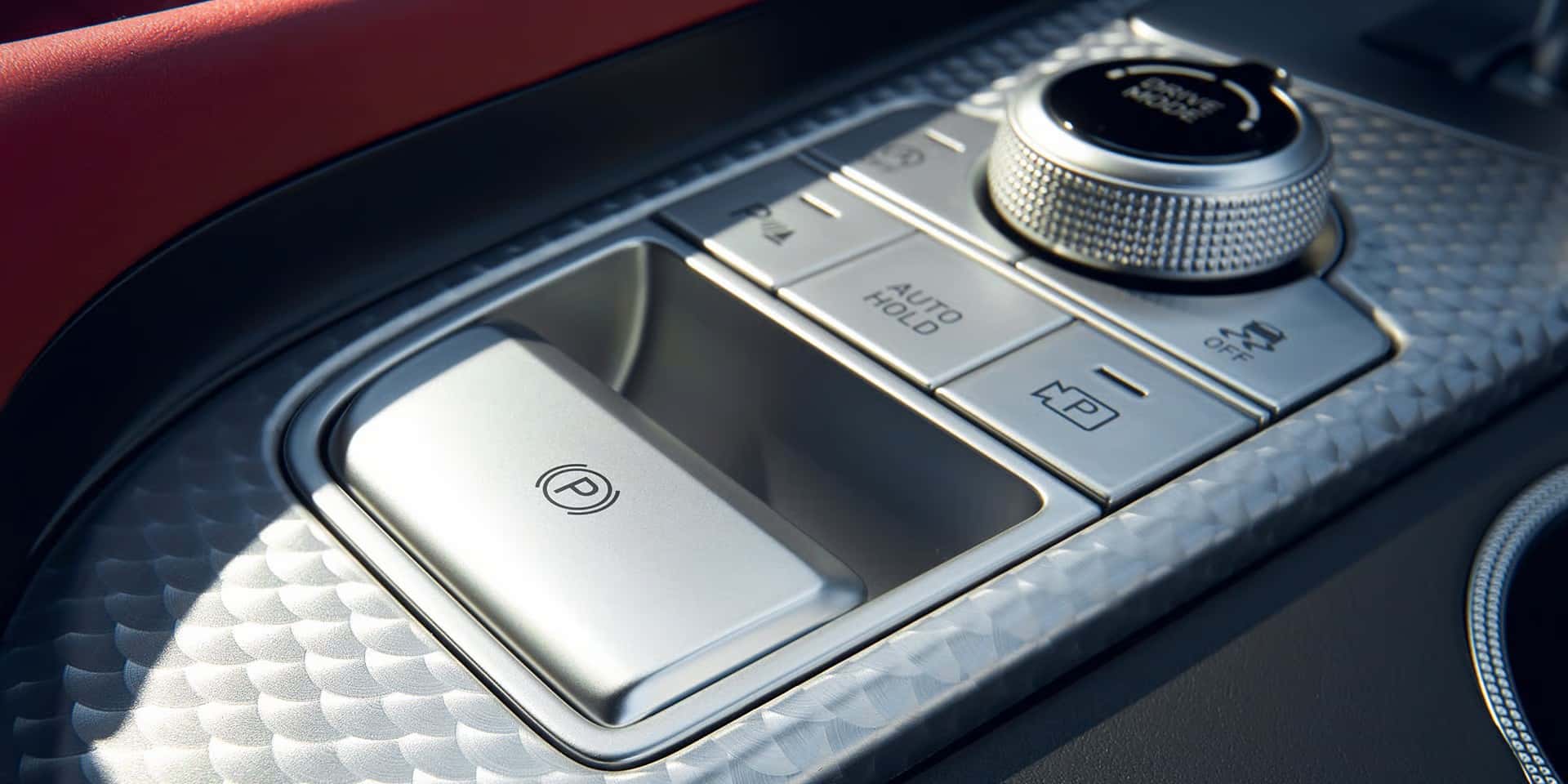
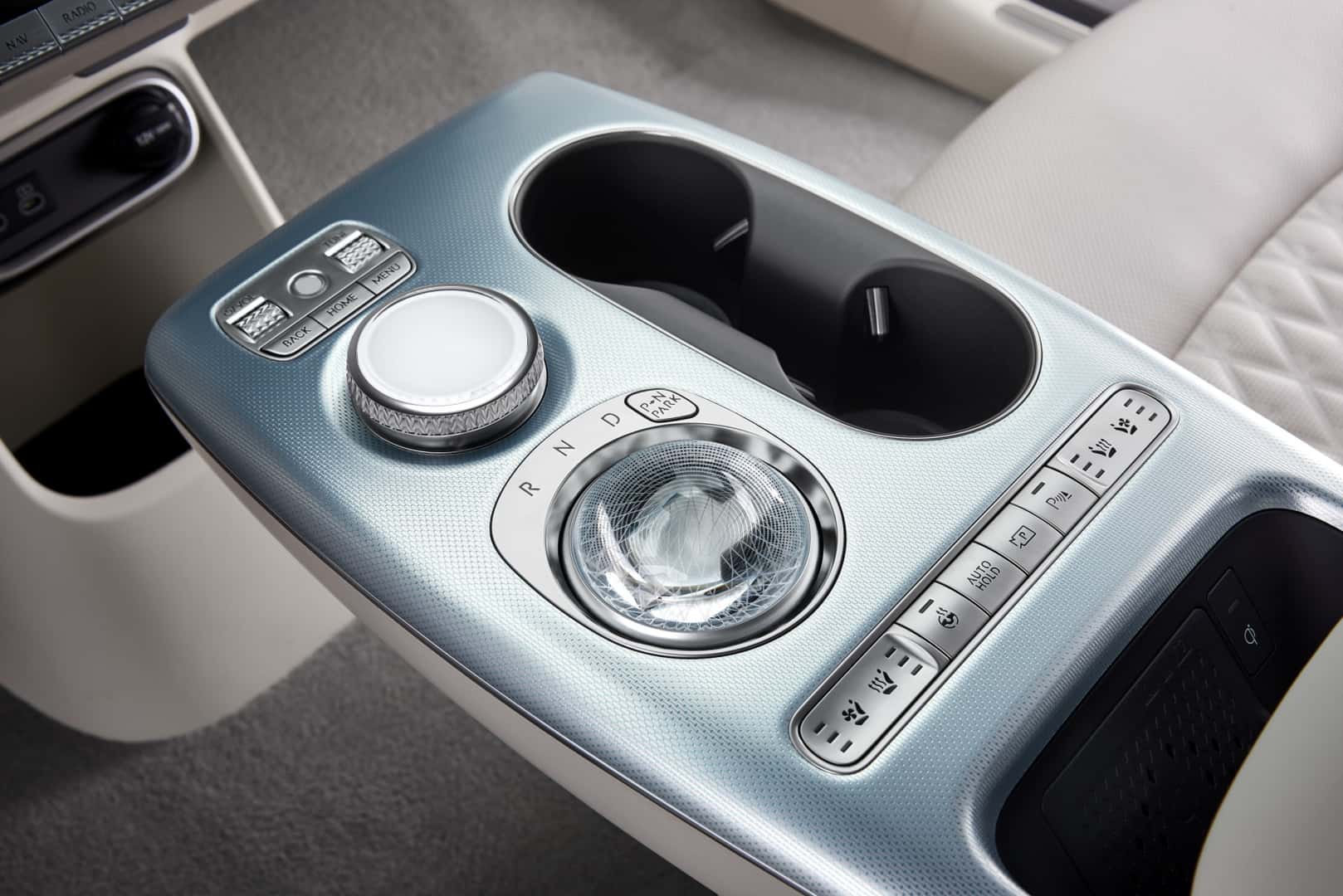
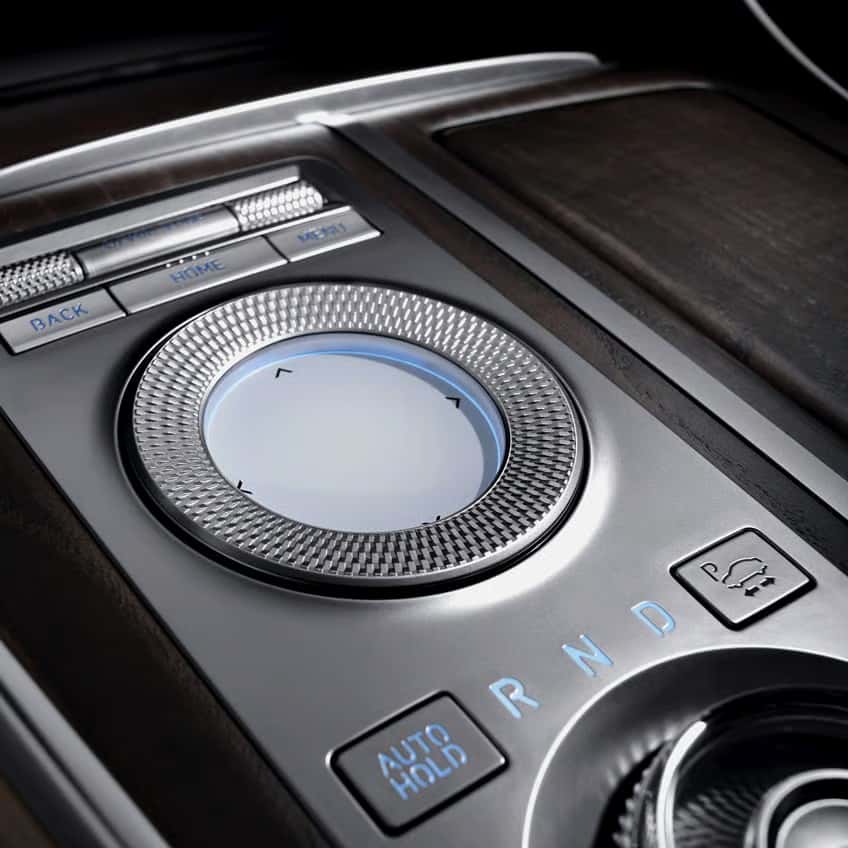
In most Genesis vehicles, the Auto Hold button is located on the center console near the electronic parking brake. The button is typically labeled “AUTO HOLD,” making it easy to identify once you know where to look.
Exact placement can vary by Genesis model and model year. In some vehicles, it may be located near the gear selector, drive mode controls, or parking brake switch. If you are unsure, check your Genesis owner’s manual or ask a Genesis of Columbia team member to point it out during your next visit.
How to Turn On the Genesis Auto Hold Button
Turning on the Genesis Auto Hold feature is simple. Before activating it, make sure you are seated properly, the vehicle is on, your seat belt is fastened, and all doors are closed.
- Start your Genesis.
- Fasten your seat belt.
- Make sure all doors, the hood, and the trunk or liftgate are fully closed.
- Press the “AUTO HOLD” button on the center console.
- Look for the Auto Hold indicator on the instrument cluster.
- Drive normally until you come to a complete stop.
- Press the brake pedal firmly to allow the system to hold the vehicle.
Once the feature is active, your Genesis will hold the vehicle in place during stops until you press the accelerator. Some Genesis models may require you to turn Auto Hold on again each time the vehicle is restarted.
How to Turn Off Auto Hold in a Genesis
To turn off Auto Hold, press the Auto Hold button again. The indicator light should turn off or change status, depending on your model. Once the system is off, your Genesis will no longer hold the vehicle automatically when you stop.
You may want to turn Auto Hold off before entering certain car washes, maneuvering in tight spaces, or driving in situations where the vehicle needs to roll freely. If you are parking and leaving the vehicle, use the electronic parking brake rather than relying on Auto Hold.
When Should You Use the Genesis Auto Hold Button?
The Genesis Auto Hold button is best used in normal driving situations where you stop often. It is especially helpful when you are driving in traffic or waiting at lights for longer periods.
Drivers commonly use Auto Hold during:
- Rush hour traffic
- Downtown driving
- School zones
- Construction zones
- Drive-thru lines
- Long red lights
- Steep hills or inclines
Auto Hold can also be helpful for drivers who experience leg fatigue. Since the system reduces the need to keep pressure on the brake pedal, it can make long drives with frequent stops more comfortable.
When Should You Not Use the Genesis Auto Hold Feature?
Although Auto Hold is convenient, there are certain situations where it may not be the best choice. In these cases, it is better to turn Auto Hold off and control the vehicle manually with the brake pedal.
- When using an automatic car wash that requires the vehicle to roll freely
- When parking the vehicle for an extended period
- When maneuvering in very tight spaces
- When driving on slippery surfaces where careful brake control is needed
- When loading the vehicle onto a tow truck or trailer
- When backing up slowly in a garage or driveway
Auto Hold is designed for temporary stops during driving. When parking your Genesis and leaving the vehicle, use the electronic parking brake and shift into Park.
Genesis Auto Hold vs. Parking Brake: What Is the Difference?
Auto Hold and the parking brake are related, but they are not the same feature. Auto Hold is intended for short stops while you remain in the driver’s seat. The parking brake is intended to secure the vehicle when parked.
Auto Hold is helpful when you are waiting at a stoplight or sitting in traffic. It releases when you press the accelerator. The parking brake should be used when the vehicle is parked, especially on a slope or when you are leaving the vehicle unattended.
A simple way to remember the difference is this: Auto Hold is for driving convenience, while the parking brake is for parked vehicle security.
Does Genesis Auto Hold Work on Hills?
Yes, Genesis Auto Hold can work well on hills. When the system is active and the vehicle comes to a complete stop, Auto Hold helps prevent the vehicle from rolling forward or backward. This can make hill starts feel more controlled and less stressful.
For example, if you are stopped on an incline and need to move your foot from the brake to the accelerator, Auto Hold helps keep the vehicle in place during that transition. Once you press the accelerator, the system releases the brakes and allows the vehicle to move forward.
Auto Hold is useful on hills, but you should still stay alert and keep your foot near the brake when conditions are steep, wet, or unpredictable.
Does Auto Hold Affect Fuel Efficiency or Brake Wear?
Genesis Auto Hold should not negatively affect fuel efficiency under normal driving conditions. The system holds brake pressure electronically rather than placing extra load on the engine.
Auto Hold also should not create unusual brake wear when used properly. The feature applies braking pressure in a controlled way, similar to holding the brake pedal manually while stopped. Since the vehicle is not moving while Auto Hold is active, normal use should not create added brake friction in the same way repeated hard braking would.
If you notice unusual brake noises, warning lights, vibration, or a change in braking feel, it is a good idea to schedule a professional inspection with Genesis of Columbia.
Is Genesis Auto Hold Safe to Use Every Day?
Yes, Auto Hold is designed for daily use. Many Genesis drivers turn it on at the beginning of each drive, especially if they regularly drive in traffic or around busy intersections.
The system includes safety conditions that must be met before it can operate. For example, Auto Hold may not activate if the driver’s seat belt is unfastened, a door is open, or another required condition is not met. These safeguards are designed to prevent unintended operation.
If the vehicle detects a system issue, a warning message may appear, and Auto Hold may be unavailable. Your standard brake system should still function, but you should have the vehicle inspected if warning messages continue.
Why Does My Genesis Auto Hold Turn Off Automatically?
Your Genesis Auto Hold system may turn off automatically in certain situations. This is usually normal and is often related to safety logic built into the vehicle.
Auto Hold may turn off if:
- The driver’s seat belt is unfastened
- A door is opened
- The vehicle is turned off
- The hood, trunk, or liftgate is opened on certain models
- The electronic parking brake is applied
- The system detects a condition that requires disengagement
If Auto Hold turns off repeatedly during normal driving and all doors are closed with your seat belt fastened, the vehicle may need an inspection.
Why Is My Genesis Auto Hold Not Working?
If your Genesis Auto Hold is not working, start with the simple checks first. In many cases, the system will not activate because one of the required conditions has not been met.
Check the following items:
- Make sure your seat belt is fastened.
- Make sure all doors are fully closed.
- Confirm the vehicle is in Drive and ready to move.
- Press the Auto Hold button and look for the indicator.
- Press the brake pedal firmly after coming to a complete stop.
- Check for warning messages on the instrument cluster.
If Auto Hold still does not activate, there may be an issue with a sensor, switch, braking component, or electronic control system. In that case, scheduling service is the safest next step.
What Does the Auto Hold Light Mean in a Genesis?
The Auto Hold light or indicator tells you the status of the system. The exact color and wording can vary by model, but the indicator generally shows whether the system is ready or actively holding the vehicle.
In many vehicles, one indicator state means Auto Hold is turned on and ready. Another indicator state may appear when the vehicle is actually being held in place. If a warning light or message appears, the system may be unavailable or require service.
Because dashboard indicators can vary by model year, your Genesis owner’s manual is the best place to confirm the exact meaning of each Auto Hold indicator.
Genesis Models With Auto Hold
Auto Hold is commonly found on many modern Genesis sedans, SUVs, and electric vehicles. Availability can vary by model year, trim, and market, so it is always best to confirm the feature on the specific vehicle you are considering.
- Genesis G70: A sport sedan with available convenience and driver assistance features.
- Genesis G80: A midsize luxury sedan with refined comfort and advanced technology.
- Genesis G90: A flagship luxury sedan with premium comfort and advanced driving support systems.
- Genesis GV60: An all-electric Genesis SUV with high-tech cabin features.
- Genesis GV70: A luxury SUV that blends comfort, performance, and everyday practicality.
- Genesis Electrified GV70: An electric luxury SUV with advanced Genesis technology.
- Genesis GV80: A premium SUV with spacious comfort and luxury features.
If you are shopping for a Genesis and want Auto Hold, review the vehicle’s equipment details or ask the Genesis of Columbia team to confirm availability.
How Auto Hold Helps With Columbia, SC Driving
Drivers in Columbia, SC often deal with busy intersections, campus-area traffic, construction zones, and frequent stop-and-go conditions. Auto Hold can make these everyday situations easier by helping reduce brake pedal fatigue.
Whether you are commuting on I-26, navigating downtown Columbia, driving near the University of South Carolina, or running errands around Forest Acres or Irmo, Auto Hold can add convenience when traffic slows down. It is a small feature, but it can make a noticeable difference during repeated stops.
For Genesis owners who value comfort and ease of use, Auto Hold fits naturally with the brand’s focus on refined driving technology.
Schedule Genesis Service for Auto Hold or Brake System Concerns
If your Auto Hold feature does not work as expected, if warning lights appear, or if your Genesis braking system feels different than usual, it is best to schedule a professional inspection. Brake-related features should always be checked by trained technicians when something feels off.
The service team at Genesis of Columbia can inspect your vehicle, review warning messages, check the braking system, and help confirm whether Auto Hold is working properly. We can also walk you through how to use the feature if you recently purchased your Genesis or are still learning your vehicle’s technology.
Frequently Asked Questions About the Genesis Auto Hold Button
What is the Genesis auto hold button?
The Genesis Auto Hold button activates a feature that keeps your vehicle stopped after you press the brake pedal and come to a complete stop. It allows you to remove your foot from the brake while stopped, then releases automatically when you press the accelerator.
How do I turn on Auto Hold in my Genesis?
Start your Genesis, fasten your seat belt, make sure all doors are closed, and press the “AUTO HOLD” button near the center console. The Auto Hold indicator should appear on the instrument cluster when the system is active.
Why does my Genesis Auto Hold button turn off automatically?
Auto Hold may turn off if the driver’s seat belt is unfastened, a door is opened, the vehicle is turned off, the electronic parking brake is applied, or the system detects a condition that requires disengagement for safety.
Can I use Auto Hold every time I drive?
Yes, Auto Hold is designed for daily use during normal driving. Many Genesis drivers activate it at the beginning of each drive, especially if they frequently drive in traffic or stop at long red lights.
Does Auto Hold work on hills?
Yes, Auto Hold can help keep your Genesis from rolling forward or backward when stopped on a hill. It releases when you press the accelerator.
Is Auto Hold the same as the parking brake?
No, Auto Hold and the parking brake are different. Auto Hold is intended for temporary stops while driving, while the parking brake is used to secure the vehicle when parked.
What should I do if Auto Hold is not working?
If Auto Hold does not activate, make sure your seat belt is fastened, all doors are closed, and the Auto Hold button has been pressed. If the issue continues or a warning message appears, schedule a professional inspection.
Does Auto Hold damage the brakes?
Auto Hold should not damage the brakes when used properly. It applies controlled brake pressure while the vehicle is stopped, similar to holding the brake pedal manually.
Getting Help With Your Genesis Vehicle in Columbia, SC
If you have questions about the Genesis auto hold button or want to make sure your vehicle’s braking system is operating properly, the team at Genesis of Columbia is here to help.
You can contact Genesis of Columbia for personalized assistance, call 803-865-3055 to speak with a knowledgeable team member, or schedule service online if your vehicle needs an inspection or maintenance.
Understanding features like Auto Hold helps you drive with more confidence and comfort. Genesis continues to design technology that supports a refined and effortless driving experience, and Auto Hold is a perfect example of that philosophy in action.
Images by OEM

0 comment(s) so far on Genesis Auto Hold Button: How It Works, When to Use It, and Why Drivers Love It