
How to Troubleshoot and Reset the 2026 Genesis Blind-Spot View Monitor
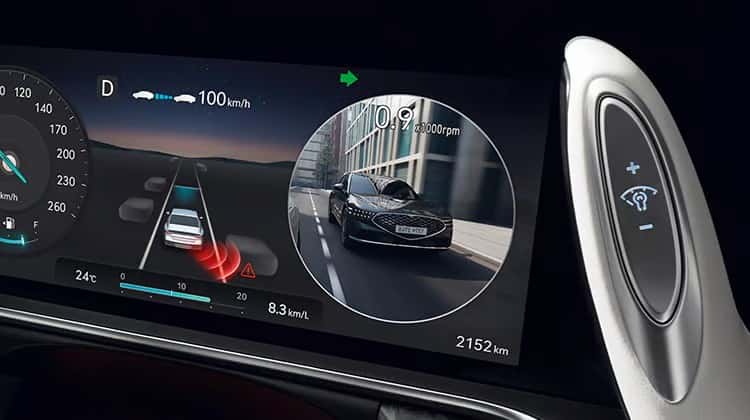
The 2026 Genesis Blind-Spot View Monitor is a camera-based safety feature that gives you a live view of adjacent blind zones right in the instrument cluster. When it stops displaying properly or throws a warning, it can feel unsettling, especially if you’ve come to rely on it every day.
Whether you’re already a Genesis owner or looking at financing options to get into a 2026 model, this guide walks through every diagnostic step so you can handle most issues yourself. If nothing below resolves the problem, our service team is standing by. You can schedule service anytime.
What the 2026 Genesis Blind-Spot View Monitor Does and How It Works
Genesis built the Blind-Spot View Monitor to show live camera footage of your blind-spot areas on the instrument cluster whenever you flip on a turn signal. The system uses cameras mounted in the side mirrors, not radar sensors. It kicks on automatically when you signal left or right, shows you that side’s camera view, then shuts off the moment you cancel the signal. Worth noting: activating your hazard flashers will also deactivate the feature.
This is a purely visual, camera-based system. It’s completely separate from any radar-based Blind-Spot Detection (BSD) setup, and mixing the two up can send you chasing the wrong fix. When diagnosing issues, keep that distinction front of mind because the solutions are camera-specific.
Common Causes of Blind-Spot View Monitor Malfunctions
The table below gives you a quick way to match what you’re seeing to a likely cause and a starting point before you work through the full step-by-step process.
| Issue Symptom | What You May See | Likely Cause | Recommended Action |
| No image on turn signal activation | Blank cluster display | Camera obstructed or dirty | Clean side mirror cameras |
| Feature won’t activate | No cluster display when signaling | System disabled in settings | Enable via Setup > Vehicle > Driver Assistance > Driving Safety |
| System activates then cuts out | Display disappears mid-drive | Hazard flashers active or instrument warning present | Deactivate hazard flashers; check cluster warnings |
| Recurring error after restart | Warning returns after ignition cycle | Software glitch | Perform infotainment hard reset |
| Persistent warning light after all resets | Warning remains across drives | Faulty camera, wiring issue, or calibration needed | Schedule professional diagnostic |
Road grime, mud, ice, and debris on the side mirror cameras are the most common triggers by far. Electrical issues, loose wiring connections, or a software glitch following a low-voltage event can also take the system offline temporarily.
Safety Limitations: What the System Can and Cannot Detect
Before working through any reset, it’s worth being clear about what this system actually does and where it stops. The Blind-Spot View Monitor cannot detect objects outside the camera’s field of view, objects too close to the vehicle, or subjects in poor visibility conditions like rain, fog, or harsh sunlight. It won’t pick up pedestrians, cyclists, or fast-approaching vehicles outside the camera’s range.
Driving without a functional Blind-Spot View Monitor means losing a genuine visibility aid. Thorough mirror checks and shoulder glances become even more important, but that’s a short-term workaround, not a solution. Don’t treat an unresolved fault as something you can just live with.
A real fault usually shows up as a persistent warning message on the cluster, a system that won’t activate on turn signal engagement, or a deactivation notification that refuses to clear on its own.
How to Reset the 2026 Genesis Blind-Spot View Monitor Step by Step
Before touching any software settings, take sixty seconds to check for physical obstructions on the side mirror cameras. Mud, ice, or debris on a lens can look exactly like a software fault and no reset in the world will fix it. A quick visual check and a wipe can save you a lot of time.
Work through these steps in order rather than jumping ahead.
Step 1: Inspect and Clean the Side Mirror Cameras
Start here. Contamination is the single most common cause of display faults, and it’s the easiest to rule out.
- Visually inspect both side mirror cameras for mud, road film, ice, or debris.
- Wipe each lens with a clean, damp microfiber cloth.
- Avoid high-pressure water at close range, which can push moisture into the camera housing.
- For heavier grime, use a mild automotive soap solution and let the area dry completely before restarting the vehicle.
In a lot of cases, this one step clears a blank cluster display entirely.
Step 2: Confirm the System Is Enabled in Vehicle Settings
Before assuming something is broken, verify the feature hasn’t simply been turned off in the infotainment menu. This happens more often than you’d expect, particularly after a system update or if someone else recently adjusted the settings.
- From the infotainment home screen, navigate to Setup > Vehicle > Driver Assistance > Driving Safety.
- Find the Blind-Spot View Monitor toggle and confirm it’s enabled.
- If it was off, turn it on and engage the turn signal to see if the cluster display comes back.
This menu path is specific to the 2026 Genesis infotainment system.
Step 3: Perform an Ignition Cycle Soft Reset
A soft reset clears minor software glitches and lets the system reinitialize cleanly.
- Turn the vehicle completely off.
- Wait at least 30 seconds so the control modules have time to fully power down.
- Restart the engine.
- Drive briefly above 10 mph to allow the system to reinitialize.
Check whether the Blind-Spot View Monitor activates normally on the next turn signal. If the warning clears, the culprit was a temporary software state and you’re done.
Step 4: Execute a Hard Reset Through the Infotainment System
If the fault is still there after the soft reset, a hard reset of the infotainment system is your next move. This process keeps your user settings intact.
- Enter accessory mode by pressing the Start/Stop button without pressing the brake.
- Press and hold the Map and Setup buttons simultaneously for about 10 seconds until the screen goes dark.
- Allow up to 2 minutes for the system to fully restart.
- Alternatively, go to Settings > General > Reset for additional options. Keep in mind that a full factory reset will erase all saved preferences.
One caveat worth flagging: if this reset disrupts any ADAS-adjacent settings, some features may need dealer-level tools to fully recalibrate. If you notice other driver assistance features behaving oddly after the reset, that’s a clear signal to bring the vehicle in. Our team can confirm full system calibration quickly. Schedule service online at your convenience.
When the Reset Doesn’t Resolve the Issue: Signs of a Deeper Fault
If you’ve gone through all four steps and a warning is still showing up, you’re likely dealing with a hardware or wiring fault rather than a software state.
Signs that point to a deeper problem:
- A warning that comes back within minutes of a successful reset.
- A system that won’t activate at any speed, regardless of settings.
- Visible physical damage to a side mirror camera from an impact.
- Water intrusion or fogging visible behind the camera lens.
None of these can be fixed through a reset. A trained technician with professional diagnostic equipment can pull any fault codes stored in the system, test camera output directly, and pinpoint the exact failure.
Schedule a Blind-Spot System Diagnostic at Genesis of Columbia
If you’ve worked through everything above and the problem is still there, bring it to our service team at Genesis of Columbia. Columbia, SC drivers can find us at 9960 Farrow Rd, Columbia, SC 29203. We’re available Monday through Friday from 7:30 AM to 6:00 PM, and Saturday from 8:00 AM to 4:00 PM.
Book Your Appointment
Schedule your diagnostic appointment online, or contact us directly if you have questions before coming in. Our technicians are trained specifically on Genesis systems and have the equipment to get your Blind-Spot View Monitor back to full operation. The system exists to protect you, and getting it working again is always worth the trip.
Images by OEM

0 comment(s) so far on How to Troubleshoot and Reset the 2026 Genesis Blind-Spot View Monitor