
How to Use Smart Cruise Control with Machine Learning on 2026 Genesis Models
Cruise control has come a long way from simple speed-lock systems. On 2026 Genesis models, it has evolved into something far more sophisticated: a machine learning-powered system that reads traffic, adapts to your habits, and makes long drives genuinely easier.
If you’re curious about what Genesis Smart Cruise Control actually does and how to get the most out of it, this guide covers the full picture. Stop by Genesis of Columbia in Columbia, SC, and our team can show you the system in action on whichever 2026 model interests you most.
What Sets Genesis Smart Cruise Control Apart from Conventional Systems
Traditional cruise control does one thing: it holds a set speed. The moment traffic slows or a car cuts in front of you, you’re back on the brakes yourself. Genesis Smart Cruise Control works differently.
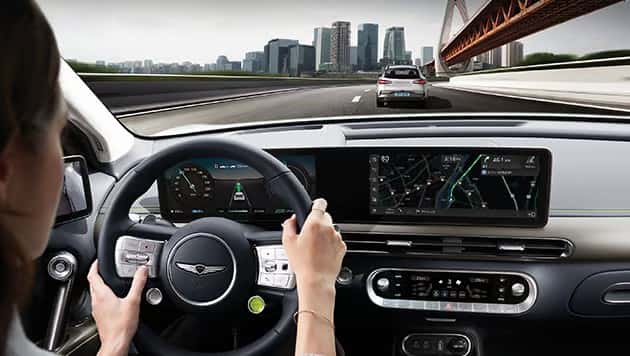
The system uses a network of sensors and real-time algorithms to monitor surrounding vehicles continuously. Rather than holding a fixed speed, it adjusts automatically based on what’s happening around you, modulating both speed and following distance without requiring driver input. Traffic can shift in seconds, and the system responds accordingly, shrinking the lag between road conditions and vehicle reaction. Driving feels more natural as a result, and the proactive response to traffic changes lowers the likelihood of close calls while supporting better fuel efficiency.
How to Activate Smart Cruise Control on Your 2026 Genesis
Getting Smart Cruise Control up and running is straightforward, even for first-time users. The activation process takes only a few seconds once you know the controls.
- On the steering wheel, press the Driving Assist button to engage the system. The dashboard displays a clear visual confirmation that SCC is active.
- Use the plus/minus controls on the steering wheel to dial in your set speed. To set SCC with no vehicle ahead, your car must be moving above 5 mph. If you’re already following another vehicle, SCC can be set from a complete stop, though you must depress the brake pedal to turn on Smart Cruise Control when stopped behind another vehicle.
- Press the dedicated distance button to choose your preferred following gap. This setting determines how much space the system maintains between your vehicle and the one ahead, and you can adjust it while driving.
- When you need to temporarily cancel SCC, use the pause/resume button. Pressing resume restores your previous set speed, so you don’t have to re-enter it manually.
Genesis designed the whole process to minimize distraction, letting drivers spend less time managing settings and more time focused on the road ahead.
How the System Learns Your Individual Driving Tendencies Over Time
The machine learning element here is worth understanding. Over time, Smart Cruise Control with Machine Learning analyzes how you drive. It tracks your acceleration habits, how you approach braking, and the following distances you tend to prefer. From that data, it builds a picture of your driving style and begins tailoring its responses accordingly.
If you consistently prefer a slightly more relaxed gap between vehicles, the system factors that in. If you tend to accelerate gradually from a stop, it learns to mirror that behavior. The more you drive with the system active, the more refined its adjustments become. This personalization reduces cognitive load, meaning you’re not constantly second-guessing whether the system will behave the way you expect. It anticipates your preferences, which makes the overall experience feel less like using a tool and more like having a capable co-driver.
If you’d like to explore which 2026 Genesis model fits your commute and driving style, our team at Genesis of Columbia is happy to help you find the right match and walk through available Genesis financing options.
What to Expect from Smart Cruise Control in Real-World Conditions
The technology works well in controlled demonstrations, but what matters to most drivers is how it performs during an actual commute or road trip. The system handles both major scenarios well.
Highway Driving: Speed Maintenance and Traffic Adaptation
On the highway, Genesis Smart Cruise Control is at its most effective. It maintains your set speed while continuously adjusting to traffic ahead. If the vehicle in front slows down, your Genesis reduces speed proportionally. When the lane clears, it accelerates back to your target speed smoothly.
This fluid management is especially valuable on long drives. Driver fatigue is a real concern on extended trips, and having a system that handles the constant micro-adjustments of speed and spacing reduces that mental strain significantly. On stretches like I-26 heading out of Columbia, SC, where traffic can shift quickly between open highway and congested segments, SCC responds to those transitions without requiring you to repeatedly intervene. The system also contributes to fuel efficiency by avoiding abrupt acceleration and braking cycles.
Stop-and-Go Traffic: Full Stops and Smooth Resumption
Urban driving presents a different challenge, and this is where many drivers are most skeptical of cruise control systems. Genesis Smart Cruise Control handles stop-and-go traffic by bringing the vehicle to a complete stop when necessary and resuming automatically once traffic begins moving again. Because SCC can be set from a standstill while following another vehicle (by depressing the brake pedal to activate it when stopped), you can engage the system even before traffic begins moving.
In practical terms, this means sitting in a slow-moving commute without constantly cycling between the accelerator and brake pedal. The system monitors the vehicle ahead and manages those transitions on your behalf. What used to feel like an exhausting stop-start grind becomes considerably more manageable. When traffic stops completely and you’ve been stationary for a moment, a light press on the accelerator or a tap of the resume button brings the system back into action.
Is Genesis Smart Cruise Control the Same as Self-Driving?
As vehicle technology becomes more advanced, this question comes up often, and it’s worth addressing directly. Genesis Smart Cruise Control is a driver-assistance feature, not an autonomous driving solution.
The distinction matters. Self-driving technology handles steering and decision-making without driver involvement. Smart Cruise Control covers speed and following distance only. You remain responsible for steering, lane changes, and all other driving decisions at all times. The system improves your experience behind the wheel without taking over your role in it.
Understanding what it does and doesn’t do helps you use it correctly and safely. Treating it as a convenience feature rather than an autonomous system is the right approach, and Genesis designs SCC with that expectation in mind.
Experience Smart Cruise Control Firsthand at Genesis of Columbia
Reading about a feature and experiencing it are two different things. Sitting behind the wheel and feeling how the system responds in real traffic gives you a far better sense of whether it suits your driving style.
Our team at Genesis of Columbia is ready to walk you through Smart Cruise Control on the models that interest you most. Whether you’re considering a GV70, a GV80, or another vehicle in the 2026 Genesis lineup, a test drive lets you engage the system directly and see how it handles actual road conditions around Columbia, SC. Our staff can answer specific questions about setup, personalization, and day-to-day use so you leave with a clear picture of what to expect as an owner.
Stop by the showroom at 9960 Farrow Rd, Columbia, SC 29203, or call our sales team at 803-865-3055. Sales hours run Monday through Friday from 9:00 AM to 7:00 PM and Saturday from 9:00 AM to 6:00 PM. You can also contact Genesis of Columbia to schedule a test drive at a time that works for you.
Images by OEM

0 comment(s) so far on How to Use Smart Cruise Control with Machine Learning on 2026 Genesis Models