
How to Use Genesis Remote Smart Parking Assist (Step-by-Step Guide)
Genesis Remote Smart Parking Assist is one of the most impressive convenience features available on select Genesis vehicles. If you have ever pulled into a tight parking space and worried about opening your door, avoiding a curb, or squeezing between two vehicles, this advanced parking technology can make those situations feel much easier.
Available Genesis Remote Smart Parking Assist can help move the vehicle into or out of certain parking spaces using sensors, cameras, steering control, braking, and smart key input, depending on the model and system version. Some Genesis systems also support in-vehicle Smart Parking and Smart Exit functions, while remote forward and backward movement can help when the vehicle is parked in a tight space.
For drivers in Columbia, SC, this feature can be especially useful in crowded parking lots, downtown parking spaces, packed shopping areas, office garages, and busy event traffic near the University of South Carolina. This guide from Genesis of Columbia explains what Genesis Remote Smart Parking Assist does, how it works, when to use it, what can cause it to stop, and which Genesis models may offer this parking technology.
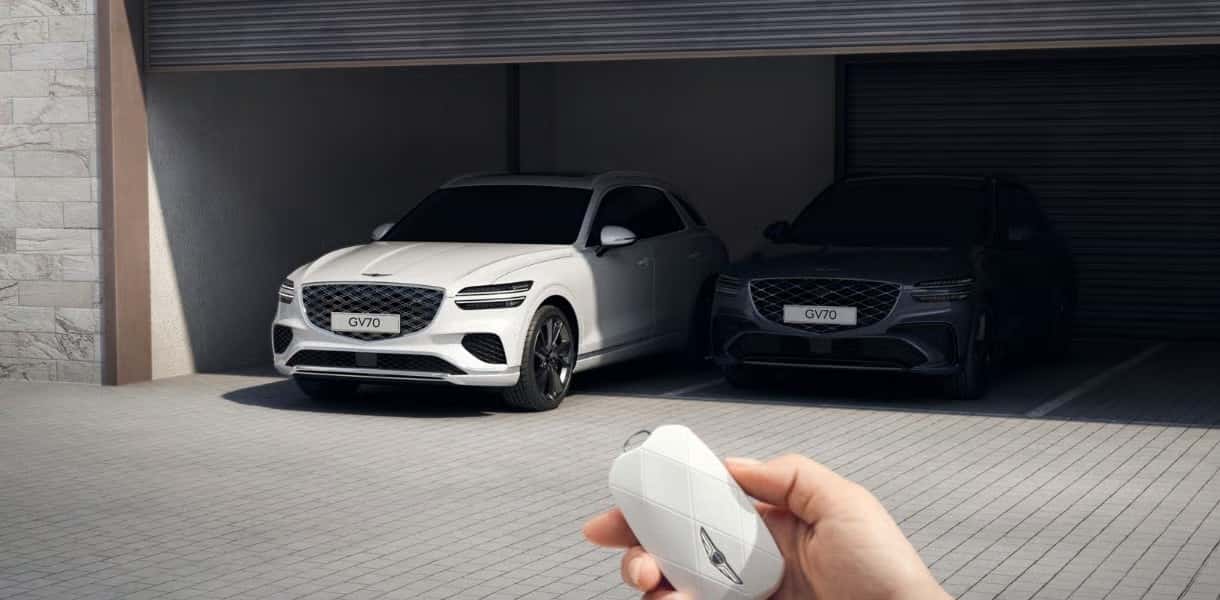
What Is Genesis Remote Smart Parking Assist?
Genesis Remote Smart Parking Assist is an available driver-assistance feature designed to help with certain parking maneuvers. Depending on the Genesis model, trim, model year, and system version, it may help control steering, braking, speed, gear changes, and vehicle movement while parking or exiting a parking space.
The feature is not a fully self-driving parking system. The driver must remain alert, supervise the vehicle, and be ready to stop the maneuver if needed. Remote Smart Parking Assist is designed to support the driver, not replace the driver’s responsibility.
On equipped Genesis vehicles, the system can be helpful when parking in tight spaces where it may be hard to open the door after pulling in. It can also help move the vehicle forward or backward from outside the vehicle using the smart key, which can be useful when another vehicle parks too close.
How Does Genesis Remote Smart Parking Assist Work?
Genesis Remote Smart Parking Assist uses sensors and cameras around the vehicle to detect nearby objects, identify available space, and help guide the vehicle during parking or exiting maneuvers. Depending on the vehicle, the system may use ultrasonic sensors, cameras, electronic steering, braking control, and smart key communication.
During operation, the vehicle monitors its surroundings and controls movement at low speeds. If an obstacle, person, vehicle, wall, curb, or other hazard is detected, the system may pause or stop. This added support can make parking feel less stressful, but it does not remove the need to watch the vehicle closely.
In simple terms, the system helps with three major parts of parking:
- Finding or confirming a suitable parking space: The vehicle uses sensors and cameras to evaluate the area.
- Controlling low-speed movement: The system can assist with steering, braking, and controlled movement.
- Helping the vehicle enter or exit: Certain functions can help the vehicle move into or out of tight spaces.
Genesis Smart Parking Assist vs. Remote Smart Parking Assist
Genesis Smart Parking Assist and Remote Smart Parking Assist are closely related, but they are not always the same function. Smart Parking Assist usually refers to parking support while the driver is inside the vehicle. Remote Smart Parking Assist adds certain functions that may be operated from outside the vehicle with the smart key.
Some Genesis vehicles may support in-vehicle Smart Parking, Smart Exit, Remote Parking, and Remote Moving Back & Forth. Feature names and capabilities can vary by model and model year, so it is important to confirm the exact system on the vehicle you are considering.
A simple way to understand the difference is this:
- Smart Parking Assist: Helps with parking while you are inside the Genesis.
- Remote Smart Parking Assist: May allow certain parking or movement functions from outside the vehicle using the smart key.
- Remote Moving Back & Forth: Helps move the vehicle forward or backward in a straight line from outside the vehicle.
How To Use Genesis Remote Smart Parking Assist With the Smart Key
The exact steps can vary by Genesis model, but the general process for remote parking or remote movement usually follows a similar pattern. Always review your Genesis owner’s manual for model-specific instructions before using the feature.
- Park near the space or area where you want to use Remote Smart Parking Assist.
- Make sure the parking area is clear of people, pets, carts, walls, posts, and other vehicles.
- Confirm that the vehicle’s sensors and cameras are clean.
- Exit the vehicle with the smart key and close all doors.
- Stand close enough to the vehicle to supervise the maneuver safely.
- Use the appropriate smart key button to command the vehicle to move forward or backward.
- Continue holding the button while the vehicle moves.
- Release the button to pause or stop the movement.
- Watch the vehicle and surrounding area at all times.
In most cases, you need to keep holding the button while the vehicle moves. If you release the button, the Genesis will usually stop or pause as a safety measure. This helps make sure the driver remains actively involved in the maneuver.
How To Use Genesis Smart Parking Assist From Inside the Vehicle
On some Genesis models, Smart Parking Assist can also help while you are seated inside the vehicle. This can be useful when backing into a parking space, entering a parallel parking spot, or exiting a tight space.
Although the process can vary, it generally works like this:
- Drive slowly near the available parking space.
- Activate the Smart Parking Assist function using the appropriate control or menu option.
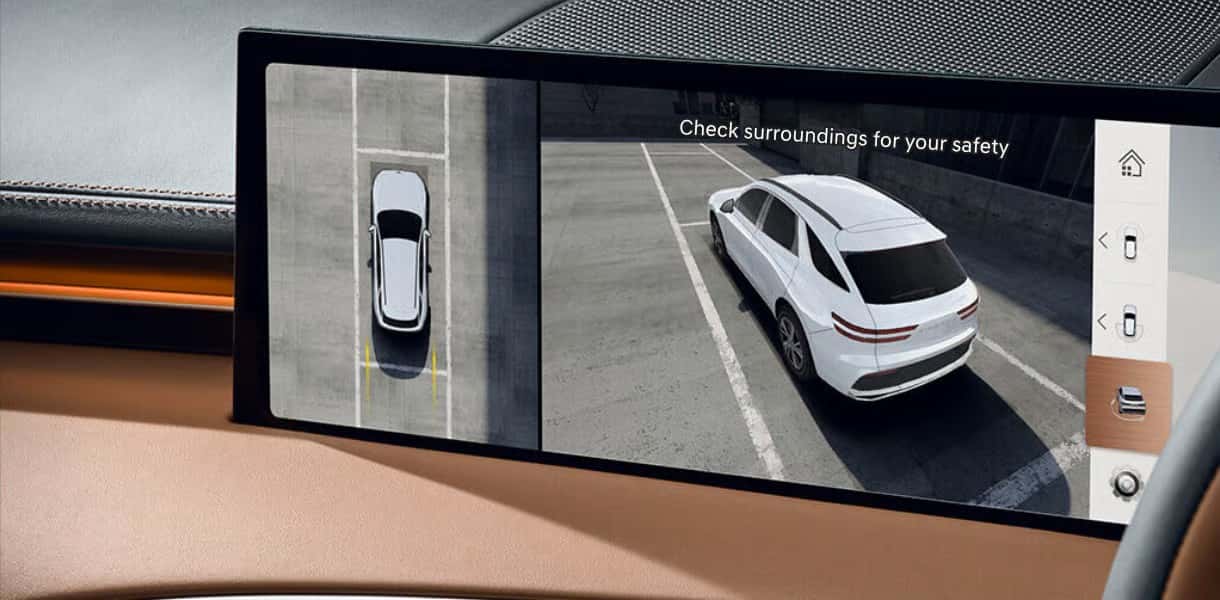
- Follow the prompts shown on the instrument cluster or infotainment display.
- Keep your hands and feet ready to take over if needed.
- Allow the system to assist with the low-speed parking maneuver.
- Stop or cancel the maneuver if the area becomes unsafe.
The system may provide visual alerts, audible chimes, camera views, and on-screen instructions. These prompts help you understand what the vehicle is doing and when driver input is needed.
What Types of Parking Spaces Can Genesis Remote Smart Parking Assist Handle?
The types of spaces supported depend on the Genesis model and version of the system. Some versions may help with straight-in parking, perpendicular parking, diagonal parking, parallel parking, Smart Exit, or remote forward and backward movement.
For example, available Remote Smart Parking Assist 2 on certain Genesis models may support more advanced parking scenarios, including diagonal, perpendicular, and parallel parking. Other systems may focus primarily on remote forward and backward movement to help the vehicle enter or exit a tight space.
Remote Smart Parking Assist may be helpful in situations such as:
- Narrow garage spaces
- Tight parking spots between two vehicles
- Parking garages with narrow lanes
- Parallel parking spaces
- Perpendicular parking spaces
- Diagonal parking spaces, when supported
- Pulling out of a space when another vehicle parked too close
Can Genesis Remote Smart Parking Assist Be Used in a Garage?
Many Genesis owners wonder whether Remote Smart Parking Assist can be used when parking inside a residential garage. In many situations, the answer is yes, provided the garage offers enough space for the vehicle to safely complete the maneuver and all system operating conditions are met. Because garages often have limited clearance around walls, shelves, bicycles, storage cabinets, and other objects, drivers should inspect the area carefully before activating the feature.
If your garage has a steep driveway, uneven flooring, or very little clearance between the vehicle and surrounding obstacles, the system may determine that conditions are unsuitable and cancel the maneuver. Likewise, objects hanging from the ceiling or extending into the vehicle’s path may not always be interpreted the way a driver expects.
Before using Remote Smart Parking Assist in a garage:
Remove bikes, toys, tools, or other obstacles from the vehicle’s path.
Verify that the garage door is fully open before beginning the maneuver.
Make sure lighting is sufficient and the sensors are clean.
Remain close enough to maintain a clear view of the vehicle throughout the entire process.
Stop the maneuver immediately if another person or pet enters the area.
Many Genesis owners appreciate this feature because it can allow them to exit the vehicle before pulling into a narrow garage where opening the driver’s door would otherwise be difficult. However, drivers should always supervise the maneuver and remember that Remote Smart Parking Assist is designed to assist with parking—not replace careful driver judgment.
Can Genesis Remote Smart Parking Assist Park the Vehicle by Itself?
No, Genesis Remote Smart Parking Assist is not a fully autonomous parking system. It is an advanced driver-assistance feature that can help with certain parking tasks, but the driver is still responsible for the vehicle.
You must watch the vehicle, monitor nearby people and objects, keep the smart key with you, and stop the maneuver if the area becomes unsafe. The system may not detect every object in every situation, especially if an object is low to the ground, very thin, moving quickly, or outside sensor range.
Think of Remote Smart Parking Assist as a helpful parking tool rather than a substitute for driver attention.
Tips for Using Genesis Remote Smart Parking Assist in Tight Parking Spaces
Remote Smart Parking Assist can be especially useful in tight spaces, but it still needs enough room to operate safely. If the space is too narrow, the vehicle may not activate the system or may cancel during the maneuver.
Use these tips to get better results:
- Make sure the space is wide enough for the vehicle to complete the maneuver.
- Clear the area of pedestrians, shopping carts, bikes, pets, and other obstacles.
- Clean dirt, rain, ice, or debris from the sensors and cameras.
- Stand where you can clearly see the vehicle and surrounding area.
- Do not use the system in fast-moving traffic or heavy pedestrian areas.
- Release the smart key button immediately if anything looks unsafe.
- Avoid using the system on steep slopes or uneven surfaces.
Downtown Columbia parking, USC event traffic, busy Forest Acres lots, and narrow parking garages can create the kind of situations where this feature may be helpful. Still, you should only use it when the area is calm enough to supervise the vehicle safely.
Genesis Remote Smart Parking Assist Safety Precautions
Before using Remote Smart Parking Assist, always make sure the area around the vehicle is safe. The system can provide valuable support, but it cannot predict every situation or replace careful driver supervision.
Before starting a remote parking maneuver, check that:
- All passengers have exited the vehicle if you are using an outside-the-vehicle function.
- All doors, the hood, and the liftgate or trunk are closed.
- The vehicle is on a suitable surface.
- The smart key battery has enough power.
- The sensors and cameras are clean.
- No people, pets, cyclists, vehicles, or objects are in the vehicle’s path.
- You are standing close enough to supervise and stop the vehicle if needed.
Do not use Remote Smart Parking Assist in crowded areas, on public roads with moving traffic, or in situations where you cannot clearly see the vehicle. You remain responsible for safe vehicle operation at all times.
Why Genesis Remote Smart Parking Assist May Stop or Cancel
Genesis Remote Smart Parking Assist may stop, pause, or cancel if the system detects a condition that could affect safe operation. This does not always mean something is broken. In many cases, the system is responding to the environment or a required condition that has not been met.
Common reasons the system may stop include:
- An obstacle is detected near the vehicle.
- A person, pet, cyclist, or vehicle enters the path.
- The driver releases the smart key button.
- The smart key moves too far away from the vehicle.
- A door, hood, trunk, or liftgate is opened.
- The pavement is slippery, uneven, or too steep.
- The parking space is too narrow.
- The vehicle is not aligned well enough to continue.
- Sensor visibility is blocked by dirt, ice, snow, heavy rain, or debris.
- The system detects a condition that requires driver control.
If the system stops, check the surroundings first. Then review the message on the vehicle display, clean the sensors if needed, reposition the vehicle, and try again only when the area is safe.
Genesis Remote Smart Parking Assist Not Working?
If Genesis Remote Smart Parking Assist is not working, start by checking the basics. Many issues are caused by normal operating limits rather than a system failure.
Try these troubleshooting steps:
- Check the smart key: Make sure the smart key is nearby and the battery is not weak.
- Close all openings: Make sure all doors, the hood, and the trunk or liftgate are fully closed.
- Clean the sensors: Wipe away mud, dust, rain, ice, snow, or road debris from sensors and cameras.
- Check the parking space: Make sure the space is not too narrow or blocked by obstacles.
- Move to level ground: The system may not work well on steep inclines or uneven pavement.
- Watch for warning messages: The display may explain why the feature is unavailable.
- Restart the process: Reposition the vehicle and try again if conditions are safe.
If Remote Smart Parking Assist continues to be unavailable or warning messages remain on the dashboard, schedule a service visit with Genesis of Columbia. A trained technician can inspect the sensors, cameras, software, and related driver-assistance systems.
Does Genesis Remote Smart Parking Assist Work in Rain, Snow, or Cold Weather?
Remote Smart Parking Assist can be affected by poor weather. Heavy rain, snow, ice, fog, road salt, mud, or debris can reduce sensor and camera performance. Extremely cold conditions may also affect how clearly sensors detect nearby objects.
Before using the system in bad weather, make sure the parking area is safe and that all sensors and cameras are clean. If visibility is poor or the system seems uncertain, park manually instead. Driver judgment should always come first.
How Close Do You Need To Be for Genesis Remote Parking?
For remote parking functions, you usually need to remain close to the vehicle with the smart key. This allows the vehicle to confirm that the authorized key is nearby and that the driver is supervising the maneuver.
If you move too far away, the system may pause or cancel. Stay close enough to clearly see the front, rear, and sides of the vehicle, while also standing in a safe location away from the vehicle’s path.
Which Genesis Models Offer Remote Smart Parking Assist?
Remote Smart Parking Assist availability depends on the Genesis model, trim, package, model year, and market. Not every Genesis vehicle includes the feature, and certain versions may offer more advanced functions than others.
Genesis models that may offer Remote Smart Parking Assist or related parking assistance features include:
- Genesis G80: Available Remote Smart Parking Assist or Remote Smart Parking Assist 2 may be offered on select trims and model years.
- Genesis GV80: Select GV80 models may include available Remote Smart Parking Assist functions.
- Genesis GV60: The GV60 may offer Remote Smart Parking Assist features depending on trim and model year.
- Genesis GV70: Parking assistance features may be available on select trims and packages.
- Genesis Electrified GV70: Advanced parking and driver-assistance features may be available depending on configuration.
- Genesis Electrified G80: Select models may offer advanced parking assistance features.
Because feature availability can change by model year and trim, the best way to confirm is to check the window sticker, vehicle build sheet, Genesis owner resources, or ask Genesis of Columbia to verify the exact vehicle you are considering.
Genesis Remote Smart Parking Assist for Columbia, SC Drivers
Parking around Columbia can get tight quickly, especially near downtown restaurants, campus events, shopping centers, medical offices, and parking garages. Remote Smart Parking Assist can help make those situations less stressful by giving drivers more flexibility when entering or exiting certain spaces.
This feature can be especially helpful when:
- You are parked between two large SUVs or trucks.
- Your garage space is narrow.
- A neighboring vehicle is parked too close to your door.
- You need to back out of a tight space carefully.
- You are parking in a crowded lot during a busy event.
Even with this technology, it is still important to use good judgment. If the area is too crowded, the space is too narrow, or visibility is poor, it may be better to park manually or choose another space.
How Remote Smart Parking Assist Works With Other Genesis Parking Features
Remote Smart Parking Assist is only one part of the broader Genesis parking and driver-assistance experience. Depending on the model and trim, your Genesis may also offer features that help you see, avoid obstacles, and park more confidently.
Related features may include:
- Surround View Monitor: Provides a camera-based view around the vehicle to help with low-speed maneuvering.
- Parking Distance Warning: Alerts you when the vehicle gets close to nearby objects.
- Parking Collision-Avoidance Assist: May help reduce the chance of low-speed parking collisions in certain situations.
- Rear Cross-Traffic Collision-Avoidance Assist: Helps warn of approaching traffic when backing out of certain spaces.
- Blind-Spot View Monitor: Shows camera views of blind spot areas on select models.
Together, these technologies can help create a more confident parking experience, especially in crowded or unfamiliar areas.
Test Drive a Genesis With Remote Smart Parking Assist at Genesis of Columbia
The best way to understand Genesis Remote Smart Parking Assist is to see it in action. If you are shopping for a Genesis with advanced parking technology, our team can help you compare available models, trims, and feature packages.
Browse our new Genesis inventory, explore our pre-owned Genesis vehicles, or visit our finance department to review your options. When you find a Genesis you like, our team can help confirm whether Remote Smart Parking Assist is included on that specific vehicle.
If you have questions about Genesis parking technology, contact Genesis of Columbia or call 803-865-3055. We will be happy to show you how available Genesis Remote Smart Parking Assist works and help you find a model that fits your daily driving needs.
Frequently Asked Questions About Genesis Remote Smart Parking Assist
What is Genesis Remote Smart Parking Assist?
Genesis Remote Smart Parking Assist is an available driver-assistance feature that can help move your vehicle into or out of certain parking spaces. Depending on the Genesis model and trim, the system may help control steering, braking, speed, gear changes, and low-speed vehicle movement.
How does Genesis Remote Smart Parking Assist work?
The system uses sensors and cameras around the vehicle to detect nearby objects and help guide the vehicle during parking maneuvers. On equipped Genesis models, some functions can be operated from inside the vehicle, while remote forward and backward movement may be controlled from outside the vehicle using the smart key.
Can you use Genesis Remote Smart Parking Assist while standing outside the vehicle?
Yes, equipped Genesis vehicles may allow certain parking or movement functions while you stand outside the vehicle with the smart key. You must remain close, keep the button pressed during operation, and supervise the vehicle at all times.
What types of parking spaces can Genesis Remote Smart Parking Assist handle?
Depending on the Genesis model and system version, Remote Smart Parking Assist may help with perpendicular parking, diagonal parking, parallel parking, Smart Exit, or remote forward and backward movement.
Do you have to keep holding the button while the vehicle is parking?
Yes, in most cases you must continue holding the appropriate smart key button during operation. If you release the button, the vehicle will usually pause or stop as a safety precaution.
How close do you need to be for Genesis remote parking to work?
You usually need to remain close to the vehicle with the smart key so the vehicle can confirm the key is nearby and the driver is supervising the maneuver. If you move too far away, the system may pause or cancel.
Will Genesis Remote Smart Parking Assist stop if it detects a person or obstacle?
The system is designed to detect obstacles in the vehicle’s path and may pause or stop if it senses a person, object, vehicle, or other hazard nearby. The driver is still responsible for watching the surroundings and confirming the maneuver is safe.
Can Genesis Remote Smart Parking Assist park the vehicle by itself in every situation?
No, Remote Smart Parking Assist is not a fully autonomous system. It may not work properly in every parking environment, especially in spaces that are too tight, on steep slopes, in poor weather, or when sensors are blocked.
Why would Genesis Remote Smart Parking Assist stop working or cancel during parking?
The system may stop or cancel because of nearby obstacles, a low smart key battery, an open door, slippery pavement, steep inclines, interrupted button input, dirty sensors, or the driver moving too far away from the vehicle.
Can Genesis Remote Smart Parking Assist be used in very tight parking spaces?
Not always. The parking space still needs to be large enough for the vehicle to safely complete the maneuver. If the space is too narrow or obstacles are too close, the system may not activate or may stop during the process.
Does Genesis Remote Smart Parking Assist work in bad weather?
Weather can affect the system. Heavy rain, snow, ice, fog, mud, or debris on the sensors may reduce how well the vehicle detects nearby objects. If conditions are poor, park manually and use extra caution.
Which Genesis models have Remote Smart Parking Assist?
Availability depends on the Genesis model, trim level, package, and model year. Some versions of the Genesis G80, GV80, GV60, GV70, Electrified GV70, and Electrified G80 may offer Remote Smart Parking Assist or related parking assistance features.
Images by OEM

0 comment(s) so far on How to Use Genesis Remote Smart Parking Assist (Step-by-Step Guide)