
How to Use the Genesis Surround View Monitor for Perfect Parking
Parking a luxury SUV in a tight downtown spot shouldn’t feel like guesswork. The Genesis Surround View Monitor gives drivers a clear, top-down look at what’s around their vehicle. If you’d like to see it in person, contact our Genesis team at Genesis of Columbia to schedule a technology demonstration.
What Is the Genesis Surround View Monitor?
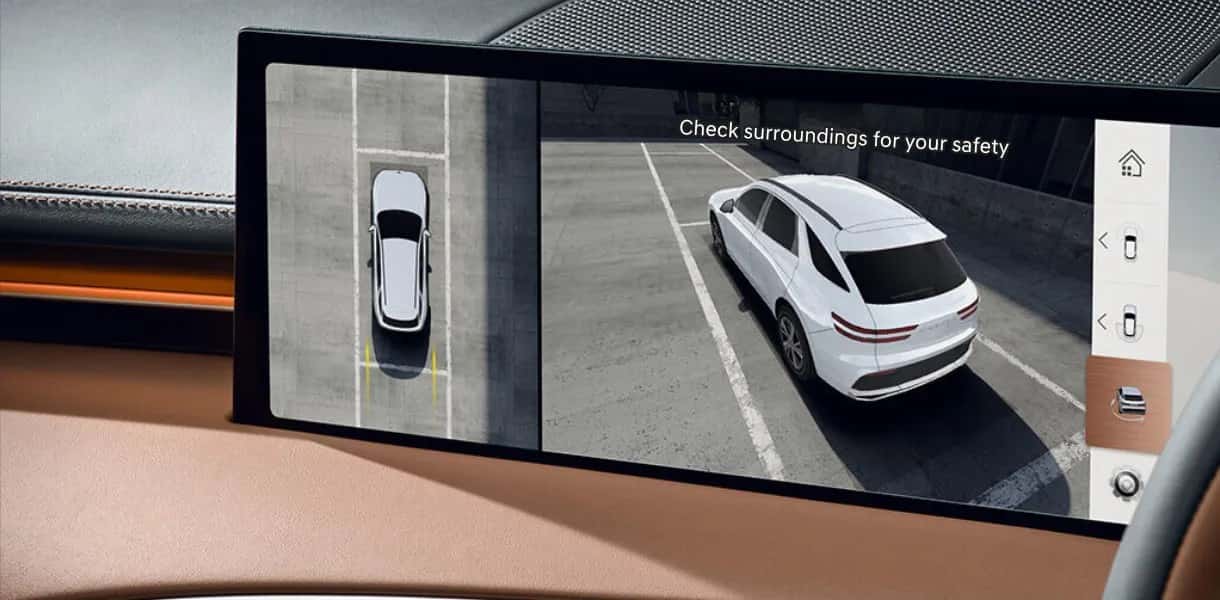
The Genesis Surround View Monitor, often shortened to SVM, is a camera-based parking aid that shows drivers a bird’s-eye perspective of their vehicle and its immediate surroundings. Instead of relying only on mirrors or a single backup camera, SVM stitches together multiple video feeds to build a fuller picture of nearby curbs, vehicles, and obstacles.
How the Camera System Creates a 360-Degree View
Four cameras make this happen: one up front, one in back, and one on each side. Together they generate a 360-degree top-down composite on the center screen. On the G80, Genesis describes the system as combining eight sensors with those four cameras, presenting the vehicle’s position on the 27-inch OLED display for a sharp, easy-to-read image.
Activating and Navigating the Surround View Monitor
SVM works automatically in common parking scenarios, though drivers can also pull it up manually for extra visibility.
Automatic Activation in Reverse and Low-Speed Driving
With the engine running, shifting into reverse automatically starts the system, and shifting back to Park stops it. Drivers who want more flexibility can enable “Auto On” through Setup > Vehicle > Driver Assistance > Parking Safety > Surround View Monitor Auto On. Once that’s on, the system activates when shifting from Reverse to Neutral or Drive, or by pressing the Parking/View button while in Park, Neutral, or Drive at speeds of 6 mph (10 km/h) or less.
There’s also an “Always On” mode, which brings up the front parking assist view any time the Parking Distance Warning is triggered while driving. Some owners have reported this front view kicking in at roughly 39 inches from an object, but that number isn’t an official Genesis spec, so treat it as a rough reference rather than a guaranteed distance.
Manually Switching Camera Views on the Center Display
Drivers aren’t limited to one camera angle. The system offers a magnified rear top view, a rear-only view, a simultaneous left-rear and right-rear split view, a combined rear-and-top view, and the full 3D surround view. Settings can also be adjusted for top-view and rear-view parking guidance, parking distance warning sensitivity, and screen brightness for daylight or night driving, along with contrast. Cycling through these views takes just a tap on the center display, letting drivers pick whichever angle makes the most sense for the space they’re navigating.
Which Genesis Models Offer This Feature
Availability of the Genesis Surround View Monitor varies by model and trim, so it’s worth knowing exactly where it shows up before you shop.
G70 2.5T Prestige
The G70 2.5T Prestige is the entry point for SVM in the G70 lineup, and it comes paired with Blind-Spot View Monitor. U.S. News has highlighted this trim’s broader feature set, which also includes ventilated front seats, Lexicon premium audio, and a wireless charger.
G80 Sport Prestige and Prestige Black
On the 2027 G80, the Surround View Monitor is optional on the 2.5T and standard on both V6 trims, the 3.5T Sport Prestige and 3.5T Prestige Black. The same pattern holds for Remote Smart Parking Assist 2 and Parking Collision-Avoidance Assist, each optional on the 2.5T and standard on the 3.5T trims. The Head-Up Display isn’t offered on the 2.5T at all and comes standard on both V6 trims.
The Blind-Spot View Monitor works a little differently. It’s optional on both the 2.5T and the 3.5T Sport Prestige, and standard only on the Prestige Black. If a live blind-spot camera feed matters to you, that’s worth confirming on the window sticker rather than assuming it comes with the V6.
GV70 2.5T Advanced and Above
The GV70 2.5T Advanced is the first trim to include genuine leather and ventilated front seats, and it’s also where the Surround View Monitor becomes standard, arriving with a panoramic sunroof, side parking distance warning, Reverse Parking Collision-Avoidance Assist, and Blind-Spot View Monitor.
The camera system carries through every trim above it. Worth noting if you’re cross-shopping model years: the 2026 lineup includes a 3.5T Sport Advanced trim that Genesis dropped for 2027, replacing the top V6 slot with the new 3.5T Prestige Graphite.
GV60 Performance AWD
On the 2026 GV60, the Surround View Monitor becomes standard at the Advanced AWD trim, arriving alongside a blind-spot view monitor, side parking sensors, rear parking collision-avoidance, genuine leather, and heated and ventilated front seats. It carries through to the top Performance AWD, which is the only trim to add Remote Smart Parking Assist 2 for parking the vehicle remotely from the key fob.
The 2026 GV60 is a broader refresh than the parking tech alone suggests. Genesis fitted a new 84-kWh battery across the entire lineup, replacing the previous 77.4-kWh pack, added the 27-inch OLED display, and switched to a native NACS charge port for adapter-free Supercharger access.
GV80 and GV80 Coupe 3.5T AWD
On the GV80, the Surround View Monitor arrives lower in the lineup than many shoppers expect. The 2.5T Advanced adds it alongside genuine leather seating, ventilated front seats, four-zone climate control, a power-folding third row, and Bang & Olufsen audio, and it carries through every trim above that including the 3.5T Advanced, 3.5T Prestige, and 3.5T Prestige Black. The GV80 Coupe offers the same camera system, where it earns its keep: the sloped fastback roofline trims rearward visibility, so the bird’s-eye view does more work than it does in the standard SUV.
On the GV80 Coupe specifically, RoadBlazing’s review points out that the sloped roofline reduces rearward visibility, which makes the bird’s-eye view from SVM especially useful when parking or reversing.
Reading the Display for Confident Parking
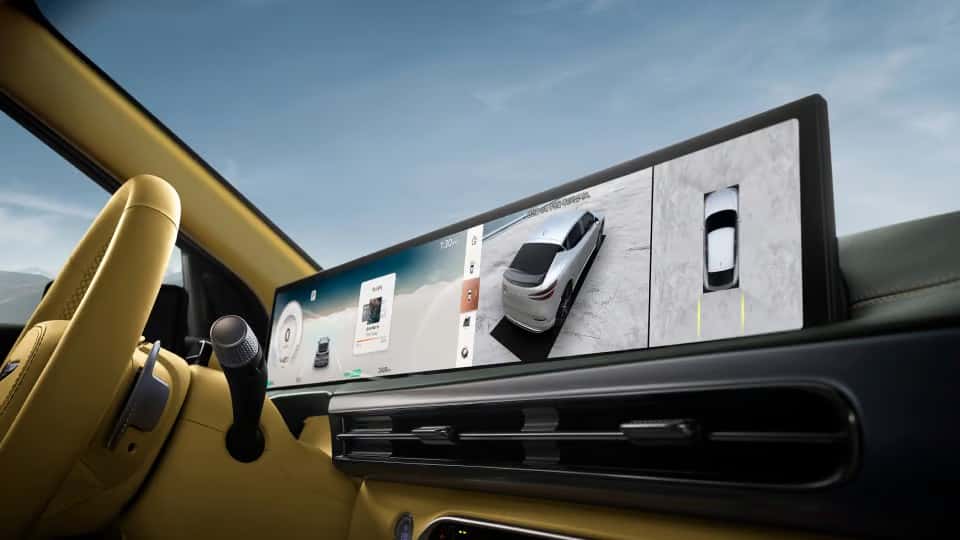
Once the system is active, the center screen displays a composite image built from all four camera feeds. Drivers get a clear read on exactly where the vehicle sits relative to nearby curbs, poles, or other cars.
Bird’s-Eye View, Guidelines, and Proximity Alerts
The display overlays dynamic guidelines that shift as the steering wheel turns, showing the vehicle’s projected path. Combined with proximity alerts from the Parking Distance Warning system, this gives drivers a real-time sense of how close they are to obstacles on all sides.
Think of SVM as backup for your own eyes and mirrors rather than a replacement for them, and it works alongside other systems like Blind-Spot View Monitor and Remote Smart Parking Assist to round out a fuller picture of the vehicle’s surroundings.
Best Uses for the Surround View Monitor
SVM earns its keep when vehicles or pedestrians appear without warning, or when space is tight enough that a small miscalculation means a scrape. CleanFleetReport’s road test of the GV60 Performance AWD frames these tight urban maneuvers and busy-lot scenarios as exactly where a surround-view system pays off.
Tight Streets, Garages, and Crowded Lots
Columbia, SC drivers know this challenge well. Squeezing into a spot near Main Street, navigating a multi-level downtown parking garage, or backing into a compact driveway in one of Columbia’s older neighborhoods all demand precise awareness of what’s around the vehicle.
The Genesis Surround View Monitor’s combined views make these situations far more manageable, whether you’re threading through a crowded lot or lining up in a narrow garage stall. If you’re weighing a purchase and want to see how these features fit your budget, you can also explore financing options with our team.
Experience the Genesis Surround View Monitor Yourself
Reading about the Genesis Surround View Monitor only goes so far. Sitting behind the wheel, checking out the bird’s-eye view, testing the guidelines, and flipping through the camera angles yourself will tell you far more about how it fits your daily driving in Columbia, South Carolina.
Stop by Genesis of Columbia at 9960 Farrow Rd, or schedule a technology demonstration with our sales team to get behind the wheel and see the system in action.
Images by OEM

0 comment(s) so far on How to Use the Genesis Surround View Monitor for Perfect Parking